So here’s the annoying thing you might be seeing in Anno 117. You set up a trade route to move soap, marble, wine, maybe a few other goods, everything looks correct… and then the ship sails off carrying only soap.
Worse, it doesn’t just load one slot — it fills every cargo slot with the same good, sometimes loading way more than you told it to, split across multiple slots like 50 soap, 25 soap, 10 soap.
This trade route bug shows up a lot on inter-island and inter-province trade routes, and once it starts, it usually keeps happening every trip.
It feels like the ship is straight-up ignoring your trade route settings, even though nothing looks wrong in the UI.
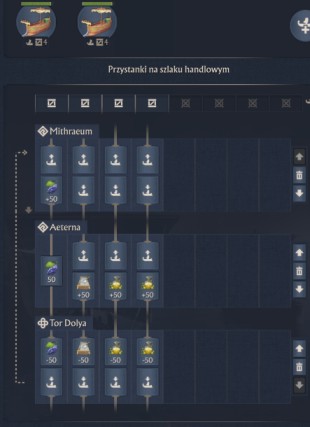
If you’ve ever stared at a ship full of soap and wondered why your marble or wine never made it across, this is exactly that problem.
Short Answer
Basically, this happens when the ship can’t unload one of the goods at the destination island, or when the trade route has more goods assigned than the ship has cargo slots.
When that unload fails, the Anno 117 trade AI doesn’t stop the route — it just shrugs and fills every cargo slot with whatever good it can load, usually the first one on the list like soap.
That’s why you end up with a trade ship loading only one type of cargo, even though the route clearly says marble, wine, and more.
Read also: Multiple Ships on Trade Route Not Increasing Capacity (Anno 117)
Why Trade Ships Load Only One Cargo Type
Cargo Slot Limitation
Every ship in Anno 117 has a fixed number of cargo slots, and each slot can hold only one type of good. If your trade route asks the ship to carry more goods than it has slots, the trade system doesn’t split them nicely. Instead, it usually locks onto the first valid resource—like soap—and loads that into every slot it can, while quietly ignoring the rest. That’s why it looks like the ship is loading only one cargo type or ignoring part of the trade route, even though the setup seems correct.
Destination Unload Failure
Another very common reason trade ships load only one type of cargo in Anno 117 is simple: the destination island can’t unload one of the goods.
This usually happens when the island’s warehouses are full, there’s no demand for that resource, or the selected dock doesn’t accept it.
When the ship hits that wall, the trade route doesn’t pause or throw an error. Instead, the trade AI fills the empty cargo slots with whatever good it can load, often the same item over and over.
That’s how you end up with a ship showing up stacked with nothing but soap while your marble or wine never makes the trip.
Read also: Anno 117 Escort Mission Bug – “Can’t Escort Ship” Issue Explained
Conditional Loading and “Wait for Goods”
If your trade route in Anno 117 uses minimum stock limits or the “wait for goods” option, this can also trigger the ship loading only one cargo type problem.
When those conditions aren’t met for some items, the ship doesn’t wait forever or balance things out — it just grabs the first resource that qualifies and fills the cargo slots with it.
That’s why routes with conditions sometimes keep sending ships full of a single good, even though multiple goods are listed in the trade route settings.
Conflicting Ship Orders
Ships that previously had:
- Manual movement commands
- Escort or patrol orders
- Automation toggled on or off
May not properly execute trade logic until all other orders are cleared.
Known Trade Route Bugs
Some cases are caused by trade route state bugs, where routes become locked to a single good despite correct configuration. This behavior is inconsistent and may depend on save state or session duration.
Quick Tips
- Ensure one cargo slot per good
- Verify the destination island has free storage capacity
- Avoid assigning more goods than the ship can carry
- Temporarily disable “wait for goods” conditions
- Clear all ship orders before assigning trade routes
- Recreate the trade route instead of editing it
- Use one ship per commodity as a reliable workaround
Anno 117 Trade Route Issue Step-by-Step Solutions
1. Match Cargo Slots to Assigned Goods
First thing to check: cargo slots. Every ship in Anno 117 has a fixed number of slots, and each slot can carry only one type of cargo. If your trade route lists more goods than the ship has slots, the route almost always breaks in weird ways. The ship will usually latch onto the first valid good—like soap—and load only that. Make sure it’s one good per slot, no exceptions.
2. Free Storage on the Destination Island
Next, look at the receiving island. If its warehouses are full, or the island doesn’t currently accept one of the goods, the ship can’t unload it. When that happens, the trade system doesn’t stop the route—it just refills the ship with whatever it can load. Clear some space, upgrade storage, or sell excess stock, then let the ship complete a full trip to see if the trade route fixes itself.
3. Recreate the Trade Route
If the ship is still loading only one type of cargo, don’t edit the route—delete it and rebuild it. Trade routes in Anno 117 can get stuck in a bad state. Create a fresh route, add one good, test it, then add the next. This clears out hidden route bugs and fixes the problem more often than you’d expect.
4. Remove Conditional Loading
Routes using minimum stock levels or “wait for goods” are much more likely to misbehave. If those conditions aren’t met perfectly, the ship will just load the first available resource and ignore the rest. Turn all conditions off while testing. Once the ship is correctly loading multiple goods again, you can re-enable them if needed.
5. Clear Conflicting Orders
Ships that previously had manual movement, escort duties, or patrol routes can struggle to follow trade logic correctly. Before assigning a trade route, clear every other order on the ship. This prevents the AI from mixing old commands with the new trade route and accidentally loading only one cargo type.
6. Split Goods Across Multiple Ships (Most Reliable Fix)
If you want the problem gone for good, split the route. One ship for soap, one for marble, one for wine. It’s not elegant, but it’s extremely reliable, especially for inter-province trade routes. Many experienced players use this setup to avoid trade route bugs entirely.
Common Causes vs Effective Fixes
| Cause | Description | Recommended Fix |
|---|---|---|
| Destination storage full | Goods cannot unload | Free warehouse space |
| Too many goods assigned | Cargo slots exceeded | Reduce goods or use more ships |
| Conditional loading active | Thresholds not met | Disable conditions |
| Conflicting ship orders | Trade logic blocked | Clear all orders |
| Route state bug | Route locks to one good | Recreate the route |
Is This a Bug or Intended Behavior?
The underlying mechanics are intended, but the resulting behavior is poorly communicated. While unload failure and slot prioritization are by design, some cases represent confirmed trade route bugs that persist despite correct configuration.
Summary
- Trade ships load only one cargo when unloading fails or slots are misconfigured
- Storage capacity is the most common cause
- Cargo slot limits must match assigned goods
- Recreating routes resolves many cases
- Splitting goods across ships is the most reliable workaround