So you met the frog martial-arts guy, got the achievement, saw Old Fox show up as “owned”… but when you open your Titles menu in Where Winds Meet, there’s no way to actually equip it.
You scroll through the list, double-check everything, and it just sits there, greyed out, mocking you. Naturally, this feels like a bug — and honestly, you’d be justified in thinking something broke.
But this is actually a very on-brand Where Winds Meet UI issue, not a missing requirement or failed unlock. The game does not automatically activate the title when the achievement pops.
Instead, it quietly drops the Old Fox title into your inventory as a claimable item. There’s no pop-up to tell you this, no tooltip pointing you in the right direction, and no explanation anywhere in the menus. If you don’t manually claim it, the title stays unusable forever.
The Fix (This Solves It for Most Players)
Before you start assuming something is broken or retrying the achievement, do this first — because this single step fixes the issue for the vast majority of players in Where Winds Meet.
Open your Inventory / Bag, then head to Items (on some versions it may be labeled Common or Misc, depending on your UI).
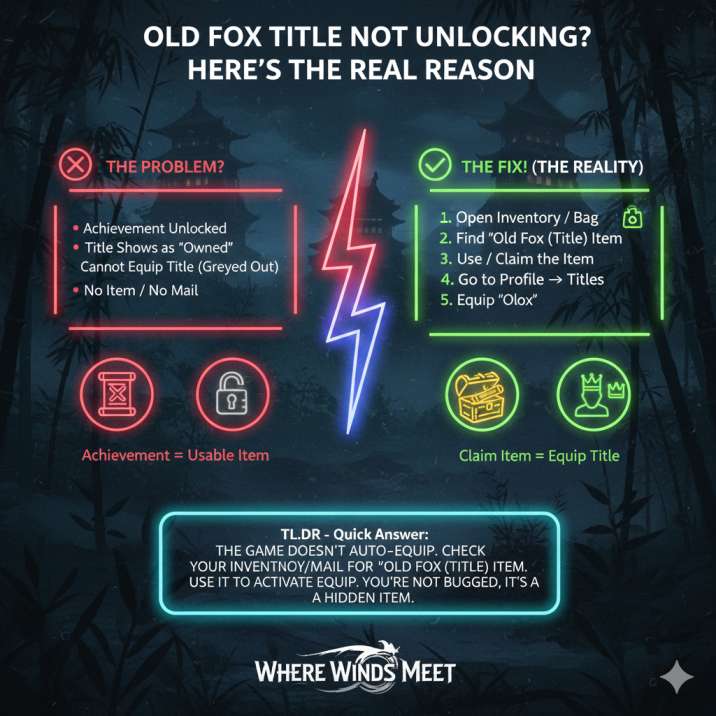
Carefully look through the list for an item named something like Old Fox (Title) or Title: Old Fox. Once you find it, use or claim the item just like you would any other reward.
After that, open Profile → Titles, and you’ll finally be able to equip Old Fox normally.
That’s it — no extra steps, no hidden requirements.
Most players never think to check their inventory because, logically, the game already showed the achievement unlocking. Unfortunately, the title isn’t auto-activated, and without claiming it manually, it just sits there unused with zero explanation.
Read also: Can’t Access Mistveil City in Where Winds Meet? Solved
Still Not Showing Up? Try These Next
If you’ve checked your inventory and the Old Fox title item still isn’t there, don’t panic yet. This is where a few extra, very common fixes come in. These usually solve the problem when the game doesn’t properly sync rewards.
1️⃣ Check Your Mail
Some rewards in Where Winds Meet are delivered through the Mail / Letters system instead of going straight to your bag. Open your Mail, claim everything you see (even unrelated stuff), then recheck both your Inventory and Titles menu. A lot of players find the title appears immediately after doing this.
2️⃣ Relog to Force a Sync
Sometimes the game just fails to register the reward properly. Exit to the title screen, fully close the game, relaunch it, and log back in. Then check your Inventory again. This surprisingly fixes a lot of weird progression issues.
3️⃣ Revisit the Frog NPC
Occasionally, the final dialogue doesn’t register correctly. Go back to the frog martial-arts NPC, talk through the conversation again, make sure it fully ends, and then relog afterward.
4️⃣ Online Mode Weirdness (Mostly PC)
If the game thinks you’re not fully online, titles may refuse to activate. Relaunch through the proper launcher, confirm you’re on the right account, and avoid offline or interrupted sessions.
So… Is This a Bug?
Officially? No.
Practically? Yeah — kind of.
In Where Winds Meet, this is one of those systems that technically works as intended, but feels broken from a player’s perspective. The game separates achievements from their actual rewards, which already creates confusion, then quietly delivers titles as inventory items without telling you. To make things worse, it shows those titles as “owned” in the menu before they’re actually usable, giving you no clue that an extra step is required.
There’s also zero explanation anywhere in the UI, so unless you already know to check your inventory or mail, you’re left assuming something went wrong. This is the exact same reason players regularly get stuck on antiques, cosmetics, and other progression trackers — the systems function, but the communication doesn’t.
Final Takeaway (So You Can Stop Stressing)
If your Old Fox title is greyed out or can’t be activated in Where Winds Meet, you didn’t mess up, miss a hidden step, or lock yourself out of anything. This is a presentation and reward-delivery issue, not a failure on your end.
All you need to do is check your Inventory or Mail and manually claim the title item. The achievement unlocking by itself isn’t enough to make the title usable, even though the game strongly implies that it should be.
Once the item is claimed, the Old Fox title becomes available immediately and can be equipped like any other title. No extra requirements, no waiting, and no further fixes needed — it works exactly as intended once that final step is done.
Old Fox Title – FAQ (Where Winds Meet)
❓ Why is the Old Fox title greyed out even though I unlocked the achievement?
Because the title isn’t auto-activated. In Where Winds Meet, the Old Fox title is given to you as a claimable inventory item, not directly added to your usable titles.
❓ I got the achievement — shouldn’t the title unlock automatically?
You’d think so, but no.
The achievement and the title reward are separate systems. The achievement unlocks first, and the title sits unused in your inventory until you manually claim it.
❓ Where exactly do I find the Old Fox title item?
Go to:
- Inventory / Bag
- Items (or Common / Misc depending on UI)
Look for something like:
- Old Fox (Title)
- Title: Old Fox
Use the item, then check Profile → Titles.
❓ I don’t see the title item in my inventory. Is it bugged?
Not necessarily. Try these before assuming it’s broken:
- Check Mail / Letters and claim all rewards
- Relog (exit fully, restart the game)
- Recheck Inventory after logging back in
Most players find it after one of these steps.
❓ Can I miss the Old Fox title permanently?
No.
As long as you unlocked the achievement, the title is tied to your character. It’s either:
- In your inventory
- In your mail
- Waiting to sync after a relog
You don’t need to redo the achievement.
❓ Does this happen with other titles too?
Yes.
This same issue affects multiple titles and collectibles in the game. Where Winds Meet often delivers rewards as silent items without telling you.
❓ Is this an actual bug?
Technically it’s working as designed, but it’s widely considered poor UI design:
- No notification
- No tutorial
- Titles look owned but aren’t usable
So the confusion is completely understandable.
❓ What’s the fastest fix if I’m stuck?
This order works best:
- Check Inventory → Items
- Check Mail
- Relog once
- Recheck Inventory
In most cases, the title appears after step 1 or 2.
https://shorturl.fm/zaOi3
https://shorturl.fm/LJ9FB
https://shorturl.fm/R0jK7
https://shorturl.fm/YQLgu
https://shorturl.fm/mp0XF
https://shorturl.fm/tYZEr
https://shorturl.fm/yF8tH
https://shorturl.fm/Iz22F
https://shorturl.fm/EDtlS
https://shorturl.fm/3hwg3
https://shorturl.fm/WjYlU
https://shorturl.fm/3mZSD
https://shorturl.fm/grzf4
https://shorturl.fm/DGHcp
https://shorturl.fm/6LgTX
https://shorturl.fm/DVZa3
Последние новинки музыки 2026 скачать бесплатно – https://shorturl.fm/rrdv9
https://shorturl.fm/qd4Tq
https://shorturl.fm/qd4Tq
https://shorturl.fm/fjUHI