
So… you logged in after the new update, realized you’re still stuck in a team, and now the Leave Team button is either gone or straight-up refusing to work. You’ve checked the menu twice. Maybe three times. Nothing. No prompt. No response. Just you, your character, and a co-op state you never asked for.
Yeah — you’re not crazy. And no, you didn’t miss some obvious menu tucked away in a corner.
A lot of console players are running into this exact problem right now, especially on PS5, and it’s directly tied to how the latest update handled co-op sessions and UI refreshes. The game sometimes fails to properly clear team status, leaving players stuck even when they’re technically solo.
The good news? This isn’t permanent, your save isn’t broken, and you don’t need to restart your character or wait around for a patch to drop. There are ways to force the game to let go of that team state.
Let’s get you out of that team.
Quick Fix First (This Works for Most Players)
Before you dig through menus or assume something is seriously broken, try this first — it genuinely solves the issue for a huge number of players and only takes a minute.
Many console players report that the game is still holding onto a co-op session in the background, even when the UI no longer shows proper team options.
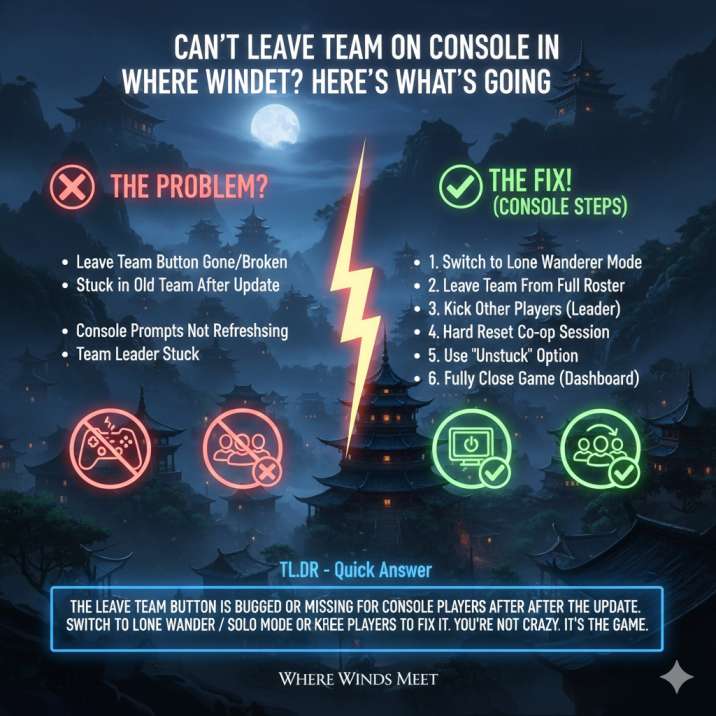
Open the main menu, then switch your mode from Shared Journey / Co-op to Lone Wanderer / Solo. Once you confirm the change, let the world fully reload instead of backing out early or skipping screens. That reload step is important, because it’s what forces the game to refresh your session state.
This simple mode swap tells the game you want to play solo and drops the team state entirely, even if the Leave Team option is bugged, missing, or unresponsive. For many players, this immediately restores normal solo play with no side effects.
If that works, you’re done. If not, keep going.
Read also: Riddle Minigame Not Loading on Mobile in Where Winds Meet? Solved
Why This Is Happening After the Update
This isn’t a “you did something wrong” situation, and it’s not tied to your progress, level, or account status. The issue started showing up after the latest update, and it’s mostly down to how the game now handles co-op session states on console.
After the update, several things can go wrong behind the scenes. The game sometimes fails to properly clear your co-op session, even after teammates leave or activities end.
As a result, the Leave Team prompt can become hidden, greyed out, or completely unresponsive. On top of that, console button prompts don’t always refresh correctly when switching modes, which makes it feel like options are missing.
Team leaders seem to run into this more often, likely because the game treats their session differently.
Basically, the system still thinks you’re in a team — even when you shouldn’t be — and the UI doesn’t know how to correct itself without a forced reset.
Try Leaving From the Full Team Screen (Not the Quick Menu)
One of the most frustrating changes after the update is that Leave Team no longer consistently appears in the quick overlay menu. A lot of players assume the option was removed entirely, when in reality it’s just been shoved into a deeper menu with no clear indicator.
Instead of relying on the quick menu, open the full Menu and navigate to Social / Online / Co-op. From there, open the Team or Lobby screen where you can see the player slots and party information. Once you’re on that screen, slow down and check the bottom action bar, because that’s where the Leave Team or Return to Solo option usually hides now.
Pay close attention to the button prompt. If it says “Hold,” you need to actually hold the button until the progress completes — tapping it won’t do anything. This trips up a lot of players because the option is technically there, it’s just badly placed and poorly communicated.
If You’re the Team Leader, Do This
If the game thinks you’re the team leader, it may refuse to let you leave in the usual way. This happens because the session is still tied to you as the host, and the UI doesn’t always offer a proper “leave” option for leaders after the update. Instead, the game expects the leader to fully dissolve the team, but never clearly explains that.
The workaround here is a bit clumsy, but it’s effective. Open the team member list from the co-op or social menu and remove the other players one by one by using the Kick option, if it’s available. Once you’re the only person left in the team, back out to the same menu and try leaving the team again.
It’s not elegant and definitely feels like a design oversight, but in many cases this forces the session to break properly and finally lets you return to solo play.
Hard Reset the Co-Op Session (Reliable Fix)
If the menus feel totally broken and nothing seems to respond correctly, it’s time to force a full session reset. Start by switching your mode to Lone Wanderer / Solo, then return all the way to the title screen instead of just backing out to the menu. From there, load back into the game normally and double-check that you’re placed into solo mode. This process clears the stuck co-op session flag that causes the game to think you’re still in a team, even when you’re not. It’s one of the most reliable fixes when the UI refuses to cooperate.
Weirdly Enough… Try “Unstuck”
It sounds unrelated, but it helps more than you’d expect. Head into Settings, select Unstuck, and confirm. The game will reposition your character and quietly refresh several session states in the background, including co-op. For some players, this alone is enough to make the Leave Team issue disappear.
Last Resort: Fully Close the Game
If absolutely nothing responds, fully close the game from your console dashboard, then relaunch it. Load back in as Solo / Lone Wanderer. This often restores missing UI prompts after updates and clears out lingering session bugs.
Quick FAQ
Is this a known bug?
Yes — and you’re definitely not alone. This issue has been popping up for a lot of players, especially on console, ever since the latest update went live. It’s being widely reported as a post-update co-op/UI problem rather than anything caused by player actions.
Is my save broken?
No. Your character, progress, gear, and story completion are all safe. This bug doesn’t affect your save data in any way, even though it can feel pretty alarming when you’re stuck in a team.
Is this a guild issue?
No. Guilds and teams are completely separate systems. Leaving a guild uses a different menu and different rules. This problem only affects temporary co-op teams.
Do PC players get this too?
Rarely. Most reports point to this being a console-specific UI or session issue, with PS5 players seeing it the most.
