
Why adding ships does not increase trade route capacity
In Anno 117, it’s very common to add multiple ships to the same trade route expecting your islands to suddenly get more goods. You assign another ship, unpause the game, and… nothing changes. Production chains are still flashing red, warehouses aren’t filling up, and it feels like the trade route capacity just refuses to go up.
What’s actually happening is this: adding ships does not increase cargo capacity per trip. Each ship still has the same fixed cargo slots, and the game does not combine those ships into one bigger delivery.
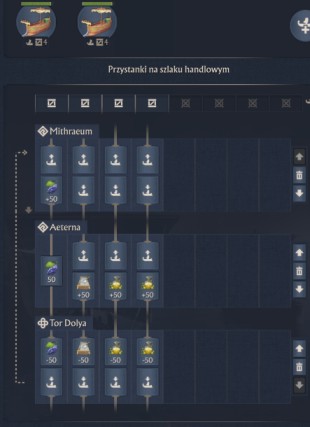
Instead, extra ships only increase trade throughput over time — meaning goods arrive more often, not in larger batches. If the route already has a bottleneck, that extra ship just ends up waiting, sailing half-empty, or unloading into a full warehouse.
That’s why it looks like nothing changed. The issue usually isn’t the number of ships on the Anno 117 trade route, but something else limiting throughput — like full destination storage, “wait for goods” being enabled, long travel times, or route rules blocking loading.
Until that bottleneck is removed, adding multiple ships won’t increase delivered goods, even though the route technically has more ships assigned.
In short: more ships increase frequency, not capacity, and if the route is already constrained, the extra ships simply can’t do any more work.
Clear answer
Adding multiple ships to a trade route in Anno 117 does not increase the cargo capacity of each ship. Every ship keeps its own fixed cargo slots, and the game does not combine ships into a single, larger shipment.
What additional ships do increase is trade throughput over time, by:
- Increasing the total number of active cargo slots moving along the route
- Increasing delivery frequency, so goods arrive more often rather than in bigger loads
If overall throughput does not improve after adding ships, the route is being constrained by something else — most commonly destination storage limits, trade route rules (such as “wait for goods”), or loading and unloading behavior at ports — not by the number of ships assigned to the route.
How trade routes work in Anno 117
Think of a trade route in Anno 117 as a schedule, not a shared cargo pool. Every ship you assign to that route runs it on its own, end to end, following the same rules but never combining its cargo with the others.
Each ship has a fixed cargo capacity. Those cargo slots never change, no matter how many other ships are on the route. When a ship reaches a port, it loads goods strictly according to the trade route rules you’ve set, sails the full route, unloads what it can, and only then starts the loop again.
There’s no mid-route sharing and no “bigger shipment” effect from having multiple ships together.
Because of this, trade performance is all about timing, not ship count. What really matters is how often ships complete the full route loop.
A shorter route with fast turnaround and multiple ships delivering frequently can easily outperform a long route run by one or two large ships, even if those ships have more cargo slots.
In practical terms, trade throughput in Anno 117 comes from efficient routes and quick delivery cycles, not from stacking more ships and expecting capacity to scale automatically.
Common reasons additional ships show no effect
When adding multiple ships to a trade route doesn’t change anything, it usually means the route is already hitting a bottleneck. From the couch, watching the ships move, here’s what’s most often going wrong in Anno 117:
Destination warehouse is full
If the receiving island has no free storage, ships arrive but can’t unload. They either sit there or leave carrying goods back with them, which kills effective trade throughput no matter how many ships are assigned.
“Wait for goods” is enabled
With this option turned on, ships will stop and wait until the exact goods and quantities are available. One waiting ship can stall the entire trade route, making it look like extra ships aren’t doing anything at all.
Port or trading post restrictions
Some ports only allow loading or unloading for specific goods or route conditions. If a ship reaches a port but isn’t allowed to trade there, it sails on empty, wasting its cargo slots and reducing delivered goods.
Partial loading behavior
Ships can reserve cargo slots for goods that aren’t ready yet. When that happens, those slots stay unused, preventing the ship from fully loading and making the route seem underpowered even with more ships added.
Long travel time
On long routes, ships spend most of their life sailing. Even with extra ships assigned, the delivery frequency may still be too low to noticeably improve island supply, masking any increase in trade throughput.
In all of these cases, the issue isn’t the number of ships — it’s a constraint somewhere along the Anno 117 trade route that needs to be removed before additional ships can make a real difference.
Quick tips to increase trade throughput
If a trade route in Anno 117 feels sluggish, these are the fixes that usually work right away — the kind you can apply while watching the ships sail past on screen.
Make sure the destination actually has space
Before adding more ships, open the receiving island and check warehouse storage. If it’s full, ships can’t unload, and trade throughput flatlines. Freeing storage often fixes the route faster than assigning another ship.
Turn off “wait for goods” unless you truly need it
This setting sounds helpful but often hurts throughput. Ships will sit around waiting for exact goods instead of running the route. Disabling it lets ships move continuously, which increases delivery frequency and keeps cargo slots working.
Use multiple smaller ships on short, high-demand routes
For nearby islands or consumer goods, several small ships moving fast usually outperform one big ship. Short loops mean higher trade route throughput, even though each ship has fewer cargo slots.
Split long or complex routes into shorter segments
Long routes hide capacity problems because ships spend most of their time sailing. Breaking one long route into two shorter Anno 117 trade routes makes deliveries more frequent and easier to balance.
Keep trade routes simple
Mixing too many goods on a single route causes partial loading and wasted cargo slots. Dedicated routes for high-demand items are easier to tune and deliver goods more reliably over time.
Fix these bottlenecks first, and only then add more ships — that’s when extra ships actually start increasing trade throughput instead of just circling the map.
Single ship vs multiple ships (comparison table)
| Scenario | One large ship | Multiple ships |
|---|---|---|
| Cargo per trip | High | Lower per ship |
| Delivery frequency | Low | High |
| Throughput over time | Moderate | High |
| Risk of blocking | High | Low |
| Best use case | Long-distance routes | Short, high-demand routes |
Summary
In Anno 117, assigning multiple ships to a trade route increases delivery frequency and overall trade throughput, not the cargo capacity of individual ships.
When adding more ships fails to improve island supply, the problem is almost always a bottleneck elsewhere — most commonly full warehouse storage, trade route configuration, or loading and unloading rules — rather than the number of ships running the route.
